
Learn how to add eFinance as a payment method for your library.
What is eFinance?
eFinance is one of Egypt's leading digital payment gateways, enabling businesses to securely accept online payments through credit cards, debit cards, Meeza cards, mobile wallets, payment links, bank installments, and other supported payment channels.
The eFinance Payment Gateway provides secure payment processing, payment status tracking, payment confirmations, refunds, and other merchant services through a set of web APIs and hosted payment pages.
By connecting your eFinance merchant account to Kotobee Author, you can sell your ebooks directly and collect payments through the eFinance payment gateway.
Getting Your Merchant Credentials from eFinance
Before integrating eFinance with Kotobee Author, you need to obtain a merchant account and the required integration credentials.
1. Contact eFinance
Visit the official eFinance website and contact the sales team to request access to the Internet Payment Gateway.
2. Complete the Merchant Onboarding Process
After your application has been approved, eFinance will create your merchant account and enable the Internet Payment Gateway service.
Depending on your agreement, eFinance may also provide access to a testing (UAT/Sandbox) environment before production.
3. Receive Your Integration Credentials
Once your merchant account has been configured, eFinance will provide all the credentials required for integration.
These typically include:
- Sender ID
- Sender Name
- Password
- Settlement Account Code(s)
These credentials are required to authenticate all requests sent to the eFinance Payment Gateway.
4. Configure Your Integration
Enter the credentials provided by eFinance into Kotobee Author to complete the payment gateway integration.
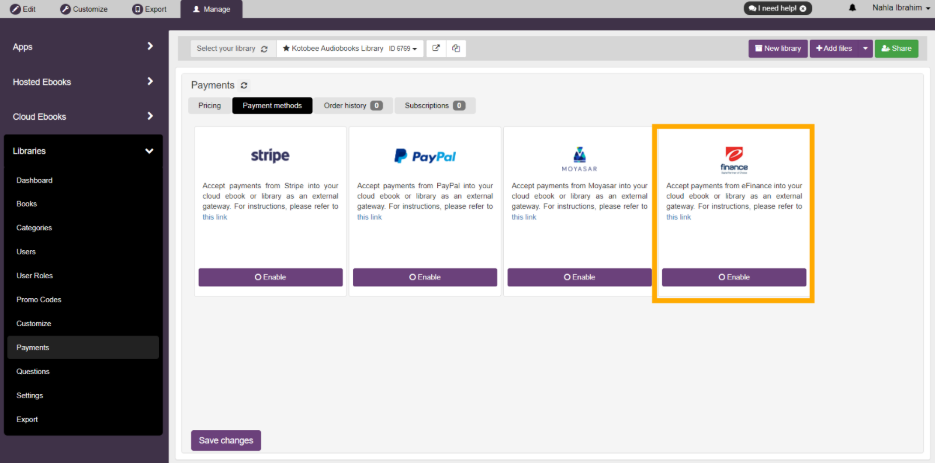
3. Enable eFinance.
4. Enter the sender_id and password using the credentials provided by eFinance.
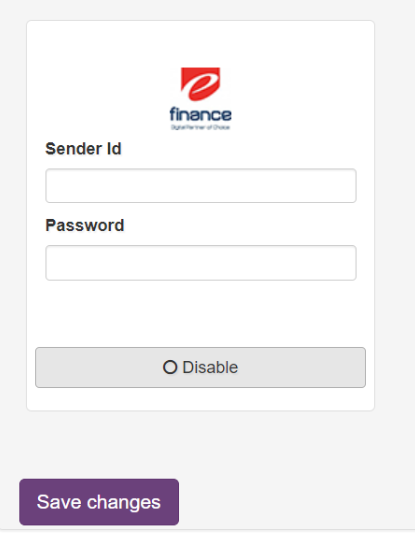
5. Click Save changes
Your ebook is now ready to accept payments through eFinance.
How Payments Work
When a reader purchases your ebook:
- They are redirected to the secure eFinance payment page.
- They complete their payment using one of the available payment methods.
- eFinance verifies the transaction.
Kotobee automatically grants access to the purchased ebook after successful payment.
Need Help?
If you're having trouble obtaining your merchant credentials or activating your merchant account, contact eFinance directly:
If you've already received your credentials but are experiencing issues connecting them to Kotobee Author, contact the Kotobee Support team.
Learn More
For more information about eFinance products and merchant services, visit:
https://www.efinance.com.eg/